
Imagine logging into your Amazon Seller Central dashboard and seeing:
“Your account has been deactivated.”
It’s every seller’s nightmare.
But don’t panic.
In this guide by Infobeam Solution, we explain why Amazon suspends seller accounts, how to avoid suspension, and how to write an effective Plan of Action (POA) to get your account reactivated fast.
❓ Why Does Amazon Suspend Seller Accounts?
Amazon’s marketplace is strict about customer experience, compliance, and fair business practices. Any violation of their policies can lead to suspension.
Here are the top 7 reasons:
| Reason | Explanation |
|---|---|
| 🚚 Late Shipping | Failing to ship orders on time |
| ❌ Order Defect Rate (ODR) | Too many negative reviews, returns, or claims |
| 📄 Inaccurate Product Listings | Misleading titles, wrong descriptions, or fake images |
| 💼 Selling Restricted Items | Listing prohibited, inauthentic, or counterfeit products |
| 📊 Account Manipulation | Fake reviews, manipulating Buy Box, or feedback abuse |
| 🧾 Poor Documentation | Invalid GST, PAN, or bank details |
| 🔄 Linked Suspended Accounts | Creating a new account from the same device/IP |
🧯 What Happens After Suspension?
Amazon usually sends an email explaining:
The reason for the suspension
Policy violated
Request for a Plan of Action (POA)
Your listings are removed, and your funds may be held until your appeal is approved.
📝 How to Reactivate a Suspended Amazon Seller Account?
Follow these steps to resolve the issue professionally:
1. Understand the Suspension Reason
Carefully read Amazon’s email and Seller Central notifications. Identify what triggered the suspension.
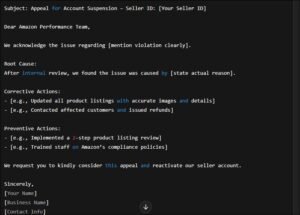
2. Prepare a Strong Plan of Action (POA)
Your POA should include:
Root Cause: What went wrong?
Corrective Measures: What steps have you taken to fix the issue?
Preventive Actions: How will you ensure it doesn’t happen again?
💡 Infobeam Tip: Be honest, concise, and solution-focused. Avoid blaming Amazon or customers.
3. Attach Required Supporting Documents
Include invoices, business licenses, GST details, or inventory proof if needed.
4. Submit Your Appeal
Go to: Seller Central > Performance Notifications > Appeal
Paste your POA and upload attachments.
5. Wait for Amazon’s Review
Amazon usually responds within 48–72 hours. You may get approved, denied, or asked for more info.
🔐 How Infobeam Solution Helps
Don’t risk losing your business due to suspension.
We offer:
Custom POA writing by professionals
Listing compliance checks
Account audit and preventive measures
Ongoing seller account management
📞 Contact Infobeam Solution for fast, expert help in getting your Amazon seller account back online.
🛡️ How to Avoid Suspension in the Future
| Best Practice | Why It Helps |
|---|---|
| ✅ Ship on time | Keeps late shipment rate low |
| ✅ Monitor feedback | Resolves issues before they escalate |
| ✅ Follow product guidelines | Avoids listing violations |
| ✅ Keep documents updated | Avoids verification-related blocks |
| ✅ Don’t create multiple accounts | Triggers suspension |
🏁 Final Words
Amazon seller account suspension is tough—but not the end of your journey.
With the right approach and expert help from Infobeam Solution, you can recover, learn from the mistake, and grow stronger.