What is Amazon A+ Content?
Amazon A+ Content (Enhanced Brand Content) allows brand-registered sellers to create visually rich product descriptions with:
✅ HD Images & Infographics
✅ Embedded Videos
✅ Comparison Charts
✅ Enhanced Bullet Points
✅ Brand Storytelling Sections
Only available to Amazon Brand Registry sellers, A+ Content replaces standard text descriptions with interactive, multimedia-rich listings that increase conversions by up to 10%.
Why Use Amazon A+ Content?
1. Stand Out from Competitors
- Over 60% of Amazon shoppers prefer listings with images & videos.
- A+ Content helps differentiate your brand in a crowded marketplace.
2. Increase Conversion Rates
- Listings with A+ Content see 3-10% higher sales (Amazon data).
- Videos & comparison charts reduce buyer hesitation.
3. Reduce Returns & Negative Reviews
- Clear, detailed content manages customer expectations.
- FAQ sections answer common questions upfront.
4. Improve SEO & Discoverability
- Keyword-rich modules help with Amazon’s search algorithm.
- More engagement = Higher rankings.
Who Can Use A+ Content?
✔ Amazon Brand Registered Sellers
✔ Vendors (1P Sellers)
✔ Amazon Exclusives & Launchpad Sellers
(If you’re not brand-registered, enroll here first.)
How to Create High-Converting A+ Content
Step 1: Choose a Template
Amazon offers 7+ pre-designed templates (Comparison, Lifestyle, Technical Specs, etc.).
Step 2: Add Engaging Modules
- Hero Banner – Showcase key selling points.
- Image & Text Overlays – Highlight benefits.
- Comparison Charts – Vs. competitors or different models.
- Video Embed – Demo the product in action.
Step 3: Optimize for SEO
- Use keywords naturally in descriptions.
- Avoid brand claims (e.g., “Best in the world”).
Step 4: Submit for Approval
Amazon reviews in 1-7 days. Once live, track performance in Brand Analytics.
Proven A+ Content Best Practices
✅ Use High-Quality Media
- 4K images (1000x1000px minimum).
- 30-60 sec videos (How-tos, unboxings).
✅ Focus on Benefits, Not Just Features
❌ “5000mAh battery”
✅ “All-day battery life – Never run out of power!”
✅ A/B Test Different Layouts
Use Manage Your Experiments (MYE) to test which version sells more.
Real Results from A+ Content
📈 +8-15% Higher Conversions (Amazon case studies)
📉 -20% Fewer Returns (Clearer product expectations)
⭐ +0.5 Avg. Star Rating (Better-informed buyers)
Need Professional A+ Content?
InfoBeam Solutions is an Amazon-certified SPN partner specializing in:
✔ A+ Content Design (Mobile-optimized layouts)
✔ Video Production (Live demos, testimonials)
✔ SEO Optimization (Keyword-rich modules)
🚀 Get a Free A+ Content Audit Today!
📞 Call +91-9654553640 or 📧 Request a Quote
Grab a shopper’s attention:
Buyers are looking at hundreds of product pages. Amazon A+ Content can help your product stand out from the crowd with formatted text, large, high-definition images or a video explaining the product usage. Cluttered product pages deter consumer interest; optimized content and formatting entices it.
Visually pleasing for consumers to skim for key information:
Chunks of paragraphs and text blocks are difficult to read. Amazon A+ uses unique images and text layouts, bulleted feature lists and product comparison charts allowing consumers to easily skim and more quickly get the information they need. With consumers visiting multiple touchpoints, providing information effectively is essential.
Bring your product into the spotlight:
A+ Content gives you the opportunity to showcase specialty features in action, provide tips for getting more out of your product or tell the story behind your product. A more comprehensive look can give consumers the confidence and trust needed to ultimately make a purchase.
Help boost conversions:
Enticing images paired with quality content can encourage consumers to hit the Buy Box. And paired with an easy buying experience for consumers, the result can lead to an increase in return on advertising spend (ROAS) and reduced advertising cost of sale (ACoS).
Fight counterfeits:
Using A+ Content will help shield your product from counterfeits. It will garner brand recognition and build reputation. Consumers will know your brand is the rightful owner of these types of products, and it will prevent others from counterfeiting.
Use proven marketing strategies:
Do the aspects of the Amazon A+ Content remind you of a well-designed brochure? That’s not a fluke. Without the limitations of an ordinary product description page, A+ Content allows sellers to explore color schemes, different formats and other strategies marketers have utilized and found successful for decades.
Improve reviews and reduce return rates:
Before purchasing products, consumers want as much information as possible. With A+ Content providing consumers with detailed information they need, you can expect fewer returns after the purchase. Fewer returns means more satisfied consumers. Satisfied consumers are likely to share positive reviews of your product and brand, which will then persuade future consumers during their own research.
Note:- Adding A+ Content to product detail pages can help increase sales by an average of 5.6%.
How to create A+ content on Amazon
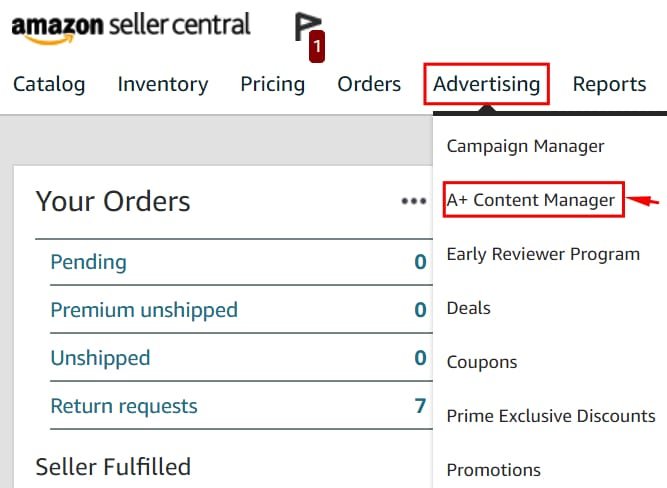
• Self-service modules
• Amazon builds for you
Amazon A+ Content Guidelines
Here are a few things to make a note of when it comes to A+ content:
- A+ content doesn’t do anything with your page ranking as A+ content is not indexed on Amazon.
- With the recent update, Amazon A+ content manager will allow you to see a preview of both your desktop and mobile version on the same screen.
- You will have to pay more for creating an A+ enhanced content for items, which are already listed by other vendors.
- You should submit your A+ content within 1 month after confirming your purchase to qualify for the promotion.
- Once the page goes live, any change or modification is allowed only in the first 2 business days of publishing.
- You are not allowed to mention your competitors or the products that they sell on your pages.
- The content that you submit (both text and images) should be unique.
- Amazon has all the rights to take down your A+ page any time. But most of the time, happens only when a vendor chooses to close his or her account, fails to fulfill the orders on time, or violates the Amazon’s terms & conditions.
- Be sure to use supported image file types such as JPG, BMP and PNG in the RGB colorspace. Avoid blurry and low quality images as these are not allowed for A+ Content.
- Proofread all your text and avoid spelling mistakes and inconsistent punctuation. Use bold and italic formatting only for headings or a few select words.
- There are quite a few requirements for including certifications and awards. We recommend researching the rules thoroughly before including them in your content. For example, certification claims and awards must be proven through text with certifying or awarding body, study, publication or other evidence. The year of the award or certification must also be specified. Environmental claims like “eco-friendly,” “biodegradable” and “compostable” are not allowed in text, images or symbols. Related claims, such as an assertion that a product is “recyclable,” must be proven in text with supporting information. Satisfaction claims are not allowed.
- Steer clear from referencing your company as a seller or distributor. Only use comparison charts when comparing against products of the same brand. Keep away from quotes or attributions made by individuals, customers or other private figures.
Tips for Amazon A+ Content
• Keep your content short and precise
• Combine images and texts
• Leverage your product reviews
• Avoid content errors
• Pay attention to image size and resolution
• Proofread your content before uploading
What is Premium Amazon A+ Content?
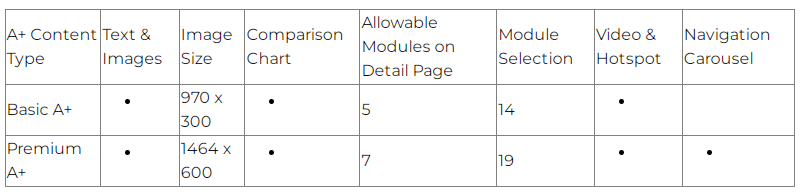
In a nutshell, Premium A+ Content is, well, a premium version of the A+ content available to Brand Registered sellers. An option that was usually only available to Vendors or through Amazon Launchpad is now available for free for third-party sellers on Seller Central (if you meet the criteria).
Premium A+ Content, sometimes called A++, includes more interactive content features, larger images, enhanced comparison charts, carousel modules, and even video modules. Compared to the basic A+ Content, it is a huge step up.
What are the eligibility criteria for Premium A+?
To be eligible to use Premium A+ Content, you must meet the following criteria:
- All of the ASINs in your catalog must contain a published A+ Brand Story
- You must have at least 15 A+ Content project submissions in “Approved” status within the past 12 months.

If you meet those criteria, you can access Premium A+ Content for free in Seller Central.
During the current promotional period, Premium A+ Content is free, but Amazon may charge a fee to use this feature in the future. Any A++ Content you publish during this promotion will stay live even if Amazon decides to charge a fee.
Features of Premium A+ Content
What features are included in Premium A+ Content that is not included in the Basic A+ Content?
- Interactive hover hotspot modules
- Multiple video modules
- Enhanced comparison charts
- Larger images on the detail page
- Carousel modules
- Q&A module
A+ Content: Basic vs Premium Comparison Guide