
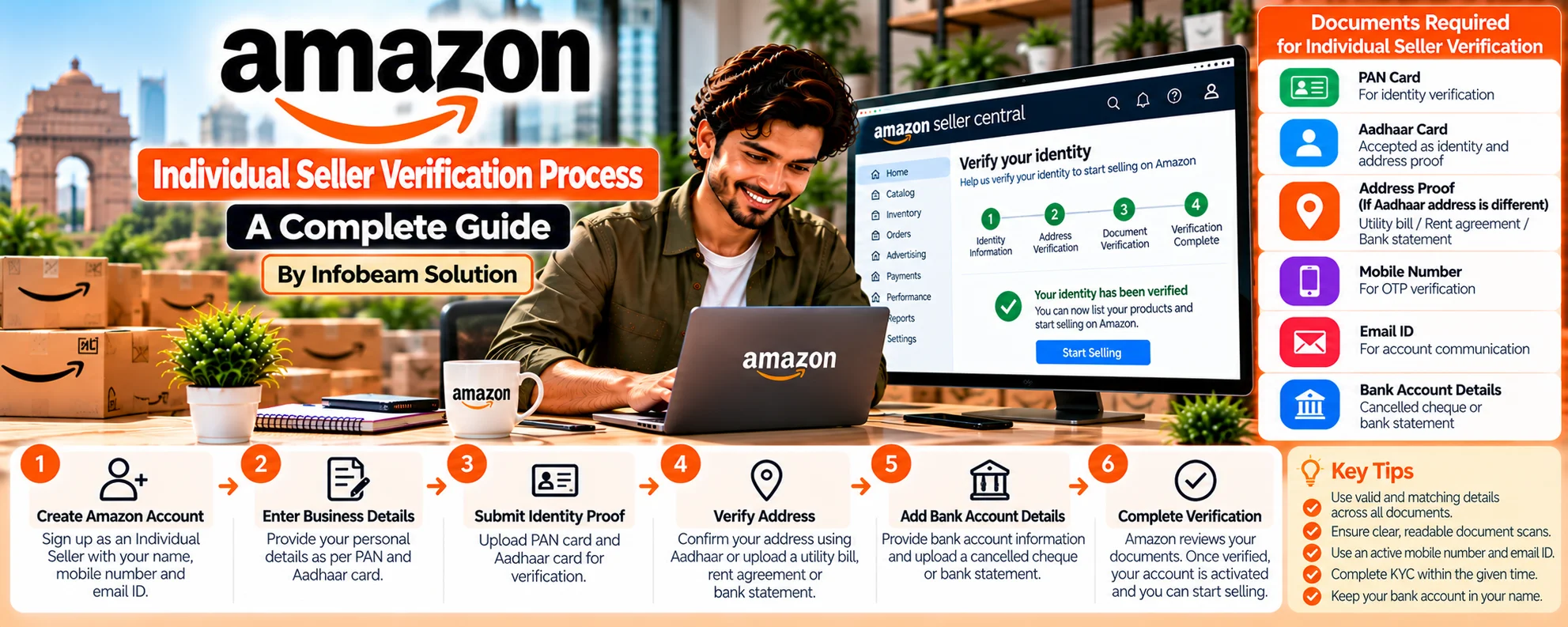
Are you planning to start selling on Amazon India as an individual seller?
Whether you’re testing the waters before going full-time or simply looking to earn passive income, Amazon’s Individual Seller Account is the easiest way to begin your e-commerce journey. But before you list your first product, Amazon requires you to complete the seller verification process.
What is an Amazon Individual Seller Account?
Amazon provides two types of seller accounts:
- Individual Seller Account – Ideal for beginners and small-scale sellers. You do not need to register a business or pay monthly fees. Amazon charges you a small commission on each sale.
- Professional Seller Account – Suitable for established businesses, this requires GST, brand registration, and has a monthly subscription fee.
With an Individual Seller Account, you can sell under your own name without a GST number (for categories allowed under GST exemption).
Why Choose an Individual Seller Account?
Here’s why many new sellers in India prefer starting with an individual account:
- No monthly subscription fees
- Ideal for side income or testing new products
- No need for company registration
- Simplified onboarding
- No mandatory GST for some categories
- Easy to scale up to a professional account later
Step-by-Step: Amazon Individual Seller Verification Process
Here’s how you can register and verify your individual seller account on Amazon India.
Step 1: Go to Amazon Seller Central
Click on “Start Selling” or “Register Now”
Sign in using your existing Amazon customer account or create a new one
Step 2: Choose “Individual” Seller Type
- Select “I am an Individual” when asked about the business type
- This option avoids monthly fees and does not require GST registration
Step 3: Fill in Basic Information
Amazon will ask for the following:
- Full Name (as per PAN Card)
- Email Address
- Mobile Number (with OTP verification)
- Business Display Name (can be your name or any brand name)
- Product Categories you plan to sell in
Step 4: Add Pickup Address and Bank Details
- Pickup Address: Where Amazon logistics or buyers can pick up your products
- Bank Account Details: For receiving payments. The account name must match the PAN card holder’s name.
Step 5: Upload KYC Documents for Verification
Amazon needs to verify your identity before allowing you to sell. These are the documents required for individual seller verification:
Documents Required for Amazon Individual Seller Verification India
| Requirement | Document | Notes |
|---|---|---|
| Identity Proof | PAN Card (mandatory) | Must be in the name of the seller |
| Address Proof | Aadhaar Card, Voter ID, Passport, Driving License | Name must match with PAN card |
| Bank Account Proof | Cancelled Cheque / Passbook Front Page | Should show account number, IFSC, and name |
| Photo (if asked) | Recent passport-sized photo | Not always required, but keep handy |
Tip: Use clear, non-blurry images or PDFs. Avoid documents with glare or cropped edges.
Amazon Video Call Verification (New in 2025)
How it works:
- You’ll receive an email or notification in Seller Central to schedule a video call
- Amazon executive will ask you to show:
- Your face
- Your original PAN card
- Your original Address Proof
- The call lasts 2–5 minutes
Tips:
- Use a good internet connection
- Choose a quiet and well-lit place
- Keep documents ready
Amazon Seller Account Activation Timeline
| Step | Approx. Time |
|---|---|
| Document upload | Instant |
| Initial screening | 24–48 hours |
| Video verification (if asked) | Within 2–4 days |
| Final approval | 3–7 days total |
Common Issues in Verification (And How to Solve Them
Document Mismatch
- Fix: Ensure your PAN name and bank account holder’s name match exactly
Blurry or Cropped Documents
- Fix: Re-upload scanned copies or clear mobile photos with good lighting
Wrong Seller Type Selected
- Fix: Cancel the current registration and restart as an “Individual”
Incorrect Address Format
- Fix: Match exactly as per Aadhaar or your address proof
Missed Video Call
- Fix: Reschedule the call from your Seller Central dashboard
Tips to Get Verified Fast on Amazon India
Use documents that match in name and address
Avoid using joint bank accounts
Upload all documents in one go
Check your email and Seller Central notifications daily
Keep your mobile number active for OTPs and calls
After Verification: What’s Next?
Once you are verified:
- You can start listing products
- Your account will be live on Amazon
- You’ll get access to Seller Dashboard
- Orders will start appearing once products are live
Infobeam Solution offers product listing services, catalog creation, and SEO optimization to help you start selling smoothly and professionally.
How Infobeam Solution Can Help You Start Selling on Amazon
At Infobeam Solution, we provide complete support for Amazon seller onboarding:
- Account creation and KYC help
- Product listing and cataloging
- Keyword-based SEO listings
- Inventory and order management
- Ads and promotion setup
Whether you’re a student, homemaker, or side hustler, we help you turn your Amazon seller account into a source of steady income.
Frequently Asked Questions
Is GST required for individual sellers on Amazon?
Can I convert my Individual Seller Account to Professional later?
What are the fees for Individual Sellers?
What if my verification fails?
Can students or homemakers register as individual sellers?
Conclusion
Becoming an Amazon seller in India has never been easier, thanks to the Individual Seller Account option. With minimal paperwork, zero monthly fees, and a simple verification process, anyone can start selling and earning from home.
However, completing the Amazon seller verification correctly is crucial to avoid delays and rejection. Follow the steps in this guide, keep your documents ready, and let Infobeam Solution be your partner in success.