
Author name: InfoBeam Solution

Amazon

Best Amazon SPN in Moradabad

What is Service Provider Network Amazon Service Provider Network Services is help new sellers to start their online business with Amazon, that includes Registration, account setup, listing products, imaging, brand registry and Sales boost service on amazon. Why need our Amazon SPN Services Sell on Amazon can be a difficult task, after all, it is the largest online marketplace in the world. The complex processes and tough competition will challenge understanding and optimizing your business for maximum results. For a successful business on Amazon, there are various things you need to get right from the start. For beginners, you need to set an excellent product catalog with attractive images and product descriptions. You need to develop competitive pricing that entails research, and most importantly, you need a fantastic customer experience. To help accomplish these things, Amazon provides you with Seller Central Platform, Amazon Seller University, and various other tools and the Seller App. These are excellent resources with information, but they can take an equally vast amount of time and effort to understand and use effectively. Amazon Service provides Network SPN is the answer to this situation. What our Amazon SPN Services Includes Amazon Account Management Services An account management service provides sellers the supports for the day–to–day seller central operations and insight that help enhance your business on Amazon. With the help of account management, it helps the sellers to overcome various difficulties that they can encounter while selling on Amazon. Click here to know more Amazon Product Listing Services Another area that helps your product buying appeal is in the cataloging department. The sellers can list new products and optimize the existing product with cataloging services by following Amazon product listing guidelines. we in JDK E-Business Services Pvt. Ltd. will help you in creating attractive SEO friendly products description that enhance the product’s discoverability on amazon searches click here to know more Amazon A+ Content Services Amazon A+ listing is an advanced feature that allows the seller to list their products effectively with complete product descriptions, HD images, and vivid contents. The A+ contents make it easy for shoppers to read and grasp product information in one shot. The idea behind such high resolutions content is to give the buyer a comprehensive detail of your products and give a seamless shopping experience. In fact, using the Amazon A+ listing service, you can increase your sales by up to 10 per cent. Click here to know more Amazon Brand Registry Services Amazon Stores is the new DIY (Do-It-Yourself) solution, which allows sellers & vendors to set up their own brand stores on Amazon.com. The feature is exclusively designed to provide customers with an immersive and rich virtual shopping experience. In short, it is a free self-service product, which enables a brand owner to create and design multi-page stores in order to highlight their products, value proposition, and brands on Amazon. Click here to know more Amazon Sales Boost Services Growing and improving sales is the topmost target of every seller – an experienced or a newbie. However, sales performance has several driving factors like SEO, repricing, and other controlling factors that make the process a tough row to hoe. You can take advantage of our Amazon Sales Boost Service to reach your business goals and take your sales game to a new horizon. Click here to know more Amazon Advertising Optimization Those brands and businesses that use Amazon’s advertising platform, the service provider network can give you expert guidance in setting and optimizing it—optimizing the advertising campaigns that can help you tremendously manage and grow your business. Click here to know more Why Choose us We are the best Amazon Service Provider Network SPN in Moradabad Increase your sales with our experts Infobeam solution is 8 years old company working in e-commerce platform like b2b or b2c portals we have very wide team who know how to increase your sales. soo give boost to your business avail our services just Call us at 9654553640 or fill the enquiry form then our experts will contact you soon-. We also achieves awards in 2020-2021, 2021-2022 from Amazon for best SPN.

Amazon

Best Amazon SPN in Agra

What is Service Provider Network Amazon Service Provider Network Services is help new sellers to start their online business with Amazon, that includes Registration, account setup, listing products, imaging, brand registry and Sales boost service on amazon. Why need our Amazon SPN Services Sell on Amazon can be a difficult task, after all, it is the largest online marketplace in the world. The complex processes and tough competition will challenge understanding and optimizing your business for maximum results. For a successful business on Amazon, there are various things you need to get right from the start. For beginners, you need to set an excellent product catalog with attractive images and product descriptions. You need to develop competitive pricing that entails research, and most importantly, you need a fantastic customer experience. To help accomplish these things, Amazon provides you with Seller Central Platform, Amazon Seller University, and various other tools and the Seller App. These are excellent resources with information, but they can take an equally vast amount of time and effort to understand and use effectively. Amazon Service provides Network SPN is the answer to this situation. What our Amazon SPN Services Includes Amazon Account Management Services An account management service provides sellers the supports for the day–to–day seller central operations and insight that help enhance your business on Amazon. With the help of account management, it helps the sellers to overcome various difficulties that they can encounter while selling on Amazon. Click here to know more Amazon Product Listing Services Another area that helps your product buying appeal is in the cataloging department. The sellers can list new products and optimize the existing product with cataloging services by following Amazon product listing guidelines. we in JDK E-Business Services Pvt. Ltd. will help you in creating attractive SEO friendly products description that enhance the product’s discoverability on amazon searches click here to know more Amazon A+ Content Services Amazon A+ listing is an advanced feature that allows the seller to list their products effectively with complete product descriptions, HD images, and vivid contents. The A+ contents make it easy for shoppers to read and grasp product information in one shot. The idea behind such high resolutions content is to give the buyer a comprehensive detail of your products and give a seamless shopping experience. In fact, using the Amazon A+ listing service, you can increase your sales by up to 10 per cent. Click here to know more Amazon Brand Registry Services Amazon Stores is the new DIY (Do-It-Yourself) solution, which allows sellers & vendors to set up their own brand stores on Amazon.com. The feature is exclusively designed to provide customers with an immersive and rich virtual shopping experience. In short, it is a free self-service product, which enables a brand owner to create and design multi-page stores in order to highlight their products, value proposition, and brands on Amazon. Click here to know more Amazon Sales Boost Services Growing and improving sales is the topmost target of every seller – an experienced or a newbie. However, sales performance has several driving factors like SEO, repricing, and other controlling factors that make the process a tough row to hoe. You can take advantage of our Amazon Sales Boost Service to reach your business goals and take your sales game to a new horizon. Click here to know more Amazon Advertising Optimization Those brands and businesses that use Amazon’s advertising platform, the service provider network can give you expert guidance in setting and optimizing it—optimizing the advertising campaigns that can help you tremendously manage and grow your business. Click here to know more Why Choose us We are the best Amazon Service Provider Network SPN in Agra Increase your sales with our experts Infobeam solution is 8 years old company working in e-commerce platform like b2b or b2c portals we have very wide team who know how to increase your sales. soo give boost to your business avail our services just Call us at 9654553640 or fill the enquiry form then our experts will contact you soon-. We also achieves awards in 2020-2021, 2021-2022 from Amazon for best SPN.
Amazon

Best Amazon SPN in Jaipur

What is Service Provider Network Amazon Service Provider Network Services is help new sellers to start their online business with Amazon, that includes Registration, account setup, listing products, imaging, brand registry and Sales boost service on amazon. Why need our Amazon SPN Services Sell on Amazon can be a difficult task, after all, it is the largest online marketplace in the world. The complex processes and tough competition will challenge understanding and optimizing your business for maximum results. For a successful business on Amazon, there are various things you need to get right from the start. For beginners, you need to set an excellent product catalog with attractive images and product descriptions. You need to develop competitive pricing that entails research, and most importantly, you need a fantastic customer experience. To help accomplish these things, Amazon provides you with Seller Central Platform, Amazon Seller University, and various other tools and the Seller App. These are excellent resources with information, but they can take an equally vast amount of time and effort to understand and use effectively. Amazon Service provides Network SPN is the answer to this situation. What our Amazon SPN Services Includes Amazon Account Management Services An account management service provides sellers the supports for the day–to–day seller central operations and insight that help enhance your business on Amazon. With the help of account management, it helps the sellers to overcome various difficulties that they can encounter while selling on Amazon. Click here to know more Amazon Product Listing Services Another area that helps your product buying appeal is in the cataloging department. The sellers can list new products and optimize the existing product with cataloging services by following Amazon product listing guidelines. we in JDK E-Business Services Pvt. Ltd. will help you in creating attractive SEO friendly products description that enhance the product’s discoverability on amazon searches click here to know more Amazon A+ Content Services Amazon A+ listing is an advanced feature that allows the seller to list their products effectively with complete product descriptions, HD images, and vivid contents. The A+ contents make it easy for shoppers to read and grasp product information in one shot. The idea behind such high resolutions content is to give the buyer a comprehensive detail of your products and give a seamless shopping experience. In fact, using the Amazon A+ listing service, you can increase your sales by up to 10 per cent. Click here to know more Amazon Brand Registry Services Amazon Stores is the new DIY (Do-It-Yourself) solution, which allows sellers & vendors to set up their own brand stores on Amazon.com. The feature is exclusively designed to provide customers with an immersive and rich virtual shopping experience. In short, it is a free self-service product, which enables a brand owner to create and design multi-page stores in order to highlight their products, value proposition, and brands on Amazon. Click here to know more Amazon Sales Boost Services Growing and improving sales is the topmost target of every seller – an experienced or a newbie. However, sales performance has several driving factors like SEO, repricing, and other controlling factors that make the process a tough row to hoe. You can take advantage of our Amazon Sales Boost Service to reach your business goals and take your sales game to a new horizon. Click here to know more Amazon Advertising Optimization Those brands and businesses that use Amazon’s advertising platform, the service provider network can give you expert guidance in setting and optimizing it—optimizing the advertising campaigns that can help you tremendously manage and grow your business. Click here to know more Why Choose us We are the best Amazon Service Provider Network SPN in Jaipur Increase your sales with our experts Infobeam solution is 8 years old company working in e-commerce platform like b2b or b2c portals we have very wide team who know how to increase your sales. soo give boost to your business avail our services just Call us at 9654553640 or fill the enquiry form then our experts will contact you soon-. We also achieves awards in 2020-2021, 2021-2022 from Amazon for best SPN.

Amazon

Best Amazon SPN in Noida

What is Service Provider Network Amazon Service Provider Network Services is help new sellers to start their online business with Amazon, that includes Registration, account setup, listing products, imaging, brand registry and Sales boost service on amazon. Why need our Amazon SPN Services Sell on Amazon can be a difficult task, after all, it is the largest online marketplace in the world. The complex processes and tough competition will challenge understanding and optimizing your business for maximum results. For a successful business on Amazon, there are various things you need to get right from the start. For beginners, you need to set an excellent product catalog with attractive images and product descriptions. You need to develop competitive pricing that entails research, and most importantly, you need a fantastic customer experience. To help accomplish these things, Amazon provides you with Seller Central Platform, Amazon Seller University, and various other tools and the Seller App. These are excellent resources with information, but they can take an equally vast amount of time and effort to understand and use effectively. Amazon Service provides Network SPN is the answer to this situation. What our Amazon SPN Services Includes Amazon Account Management Services An account management service provides sellers the supports for the day–to–day seller central operations and insight that help enhance your business on Amazon. With the help of account management, it helps the sellers to overcome various difficulties that they can encounter while selling on Amazon. Click here to know more Amazon Product Listing Services Another area that helps your product buying appeal is in the cataloging department. The sellers can list new products and optimize the existing product with cataloging services by following Amazon product listing guidelines. we in JDK E-Business Services Pvt. Ltd. will help you in creating attractive SEO friendly products description that enhance the product’s discoverability on amazon searches click here to know more Amazon A+ Content Services Amazon A+ listing is an advanced feature that allows the seller to list their products effectively with complete product descriptions, HD images, and vivid contents. The A+ contents make it easy for shoppers to read and grasp product information in one shot. The idea behind such high resolutions content is to give the buyer a comprehensive detail of your products and give a seamless shopping experience. In fact, using the Amazon A+ listing service, you can increase your sales by up to 10 per cent. Click here to know more Amazon Brand Registry Services Amazon Stores is the new DIY (Do-It-Yourself) solution, which allows sellers & vendors to set up their own brand stores on Amazon.com. The feature is exclusively designed to provide customers with an immersive and rich virtual shopping experience. In short, it is a free self-service product, which enables a brand owner to create and design multi-page stores in order to highlight their products, value proposition, and brands on Amazon. Click here to know more Amazon Sales Boost Services Growing and improving sales is the topmost target of every seller – an experienced or a newbie. However, sales performance has several driving factors like SEO, repricing, and other controlling factors that make the process a tough row to hoe. You can take advantage of our Amazon Sales Boost Service to reach your business goals and take your sales game to a new horizon. Click here to know more Amazon Advertising Optimization Those brands and businesses that use Amazon’s advertising platform, the service provider network can give you expert guidance in setting and optimizing it—optimizing the advertising campaigns that can help you tremendously manage and grow your business. Click here to know more Why Choose us We are the best Amazon Service Provider Network SPN in Noida Increase your sales with our experts Infobeam solution is 8 years old company working in e-commerce platform like b2b or b2c portals we have very wide team who know how to increase your sales. soo give boost to your business avail our services just Call us at 9654553640 or fill the enquiry form then our experts will contact you soon-. We also achieves awards in 2020-2021, 2021-2022 from Amazon for best SPN.

Amazon

Best Amazon SPN in Delhi NCR

What is Service Provider Network Amazon Service Provider Network Services is help new sellers to start their online business with Amazon, that includes Registration, account setup, listing products, imaging, brand registry and Sales boost service on amazon. Why need our Amazon SPN Services Sell on Amazon can be a difficult task, after all, it is the largest online marketplace in the world. The complex processes and tough competition will challenge understanding and optimizing your business for maximum results. For a successful business on Amazon, there are various things you need to get right from the start. For beginners, you need to set an excellent product catalog with attractive images and product descriptions. You need to develop competitive pricing that entails research, and most importantly, you need a fantastic customer experience. To help accomplish these things, Amazon provides you with Seller Central Platform, Amazon Seller University, and various other tools and the Seller App. These are excellent resources with information, but they can take an equally vast amount of time and effort to understand and use effectively. Amazon Service provides Network SPN is the answer to this situation. What our Amazon SPN Services Includes Amazon Account Management Services An account management service provides sellers the supports for the day–to–day seller central operations and insight that help enhance your business on Amazon. With the help of account management, it helps the sellers to overcome various difficulties that they can encounter while selling on Amazon. Click here to know more Amazon Product Listing Services Another area that helps your product buying appeal is in the cataloging department. The sellers can list new products and optimize the existing product with cataloging services by following Amazon product listing guidelines. we in JDK E-Business Services Pvt. Ltd. will help you in creating attractive SEO friendly products description that enhance the product’s discoverability on amazon searches click here to know more Amazon A+ Content Services Amazon A+ listing is an advanced feature that allows the seller to list their products effectively with complete product descriptions, HD images, and vivid contents. The A+ contents make it easy for shoppers to read and grasp product information in one shot. The idea behind such high resolutions content is to give the buyer a comprehensive detail of your products and give a seamless shopping experience. In fact, using the Amazon A+ listing service, you can increase your sales by up to 10 per cent. Click here to know more Amazon Brand Registry Services Amazon Stores is the new DIY (Do-It-Yourself) solution, which allows sellers & vendors to set up their own brand stores on Amazon.com. The feature is exclusively designed to provide customers with an immersive and rich virtual shopping experience. In short, it is a free self-service product, which enables a brand owner to create and design multi-page stores in order to highlight their products, value proposition, and brands on Amazon. Click here to know more Amazon Sales Boost Services Growing and improving sales is the topmost target of every seller – an experienced or a newbie. However, sales performance has several driving factors like SEO, repricing, and other controlling factors that make the process a tough row to hoe. You can take advantage of our Amazon Sales Boost Service to reach your business goals and take your sales game to a new horizon. Click here to know more Amazon Advertising Optimization Those brands and businesses that use Amazon’s advertising platform, the service provider network can give you expert guidance in setting and optimizing it—optimizing the advertising campaigns that can help you tremendously manage and grow your business. Click here to know more Why Choose us We are the best Amazon Service Provider Network SPN in Delhi NCR Increase your sales with our experts Infobeam solution is 8 years old company working in e-commerce platform like b2b or b2c portals we have very wide team who know how to increase your sales. soo give boost to your business avail our services just Call us at 9654553640 or fill the enquiry form then our experts will contact you soon-. We also achieves awards in 2020-2021, 2021-2022 from Amazon for best SPN.

How to list your product on Amazon
Amazon

How to List Your Product on Amazon: A Step-by-Step Guide for Sellers

How to List Your Product on Amazon: A Step-by-Step Guide for Sellers Selling on Amazon can be a game-changer for your business, but the listing process can be confusing, especially for new sellers. Whether you’re an individual seller or a brand, InfoBeam Solutions (an Amazon SPN-certified partner) breaks down the process into simple, actionable steps to help you list products correctly and maximize sales. Step 1: Set Up Your Amazon Seller Account Before listing products, you need a Seller Central Account. Choose Your Selling Plan: ✔ Individual Plan ✔ Professional Plan Register Your Account: Go to Amazon Seller Central Click “Register Now” Provide business details (GSTIN, PAN, bank info for payouts) Complete identity verification Pro Tip: If you’re a brand owner, enroll in Amazon Brand Registry for extra benefits like A+ Content & brand protection. Step 2: Find Your Product on Amazon (or Create a New Listing) Option 1: Product Already Exists on Amazon Search for the product using its UPC/EAN/ISBN (Barcode) ASIN (Amazon Standard Identification Number) If found, click “Sell on Amazon”Enter your price, condition (New/Used), and stock quantity Option 2: Create a New Product Listing If your product isn’t listed, you’ll need to add it manually: In Seller Central, go to Inventory > Add a Product > Create a New Listing Select the correct product category (Amazon has strict category approvals for some items) Fill in required details (Title, Brand, Manufacturer, etc.) Step 3: Optimize Your Product Listing for Maximum Sales A well-optimized listing ranks higher & converts better. A. Product Title (Most Important for SEO) Format:Brand + Product Name + Key Features (Color, Size, Quantity)Example:❌ “Wireless Earbuds”✅ “InfoBeam Pro Wireless Earbuds – Bluetooth 5.3, 40H Playtime, IPX7 Waterproof, Noise Cancelling” B. High-Quality Images (Amazon’s Requirements) ✔ Main Image: Pure white background (RGB 255,255,255)✔ Additional Images: Show lifestyle shots, angles, features✔ Minimum 1000×1000 pixels (Zoom-enabled) C. Bullet Points (Highlight Key Benefits) Use 5 bullet points max Focus on customer pain points (Not just specs) Include keywords naturally Example:❌ “Long battery life”✅ “Enjoy 40 hours of playtime – 5x longer than most wireless earbuds” D. Product Description (Detailed & SEO-Friendly) Write in full sentences (Not just keywords) Use bold/italics for emphasis Mention warranty, certifications, or guarantees Step 4: Set Pricing & Fulfillment Method A. Competitive Pricing Strategy ✔ Check competitor prices using Jungle Scout/Keepa✔ Offer discounts for first-time buyers B. Choose Fulfillment Method ✅ FBA (Fulfillment by Amazon) Amazon handles storage, shipping & returns Eligible for Prime badge (Faster sales) ✅ FBM (Fulfillment by Merchant) You ship orders yourself Lower fees but no Prime benefits Step 5: Launch & Promote Your Listing A. Run Amazon PPC Ads ✔ Sponsored Products (Keyword-targeted ads)✔ Sponsored Brands (Promote your brand store) B. Get Early Reviews (Legally) ✔ Use Amazon’s “Request a Review” button✔ Join Amazon Vine (Free product samples for reviews) C. Monitor Performance & Optimize ✔ Track impressions, clicks & conversions in Seller Central✔ Update keywords & images based on performance Common Amazon Listing Mistakes to Avoid ❌ Incorrect Category → Listing may get suppressed❌ Poor Images → Lower click-through rates❌ Keyword Stuffing → Hurts readability & SEO❌ Ignoring Competitor Pricing → Losing Buy Box Input information about your products in the file Once you open the excel file, you can go to the instructions sheet that has all the step-by-step information required to list the products for that specific category. The Data Definition sheet gives detailed information on the use of each field that you are required to fill in to create the product listings. Finally, you can click on the Template Sheet and start filling in the product details such as Title, SKU, Product ID, Product ID type, Product Format etc. All mandatory data required for listing are clearly highlighted in bold. However, it is highly recommended to provide as much data available as possible. Once all the necessary columns are filled, you can save the file on your desktop and make sure while saving you follow the file format as mentioned in the excel. Upload the file to Amazon.in via your Seller Central Account Once again, log on to your Seller Central account and click on Inventory. Continue on to the Add products via upload page and under the Upload Your Inventory File tab, go to File Type and select Inventory Files. Then click on the browse button, select the saved and edited excel file and click on the Upload Now button. Do keep an eye on the Upload Status and keep monitoring it. Once done, you will receive a confirmation message indicating that your file has been uploaded successfully and that your bulk listing is complete. It’s that simple! How to list products on Amazon that do not have barcode/UPC/EAN? Amazon uses product IDs to identify the exact item being sold. If you match a listing, you won’t need to provide a product ID since it already exists. If you’re adding a product that’s new to Amazon, you may need to purchase a UPC code or request an exemption. If the product you sell does not have a barcode or a Global Trade Item Number (GTIN), you can request a GTIN exemption to sell your products on Amazon international marketplaces. Once we have reviewed and approved your application, you will be able to list your products. Need Expert Help? InfoBeam Solution Can List & Optimize for You! As an Amazon SPN-certified agency, we offer: ✅ Full Amazon Account Setup✅ Professional Product Listing Optimization✅ A+ Content & Brand Registry Services✅ PPC Advertising Management 🚀 Get Started Today!📞 Call +91-9654553640 or 📧 Book a Free Consultation

amazon a+
Amazon

Amazon A+ Content: The Ultimate Guide to Boost Sales in 2025

What is Amazon A+ Content? Amazon A+ Content (Enhanced Brand Content) allows brand-registered sellers to create visually rich product descriptions with: ✅ HD Images & Infographics ✅ Embedded Videos ✅ Comparison Charts ✅ Enhanced Bullet Points ✅ Brand Storytelling Sections Only available to Amazon Brand Registry sellers, A+ Content replaces standard text descriptions with interactive, multimedia-rich listings that increase conversions by up to 10%. Why Use Amazon A+ Content? 1. Stand Out from Competitors Over 60% of Amazon shoppers prefer listings with images & videos. A+ Content helps differentiate your brand in a crowded marketplace. 2. Increase Conversion Rates Listings with A+ Content see 3-10% higher sales (Amazon data). Videos & comparison charts reduce buyer hesitation. 3. Reduce Returns & Negative Reviews Clear, detailed content manages customer expectations. FAQ sections answer common questions upfront. 4. Improve SEO & Discoverability Keyword-rich modules help with Amazon’s search algorithm. More engagement = Higher rankings. Who Can Use A+ Content? ✔ Amazon Brand Registered Sellers ✔ Vendors (1P Sellers) ✔ Amazon Exclusives & Launchpad Sellers (If you’re not brand-registered, enroll here first.) How to Create High-Converting A+ Content Step 1: Choose a Template Amazon offers 7+ pre-designed templates (Comparison, Lifestyle, Technical Specs, etc.). Step 2: Add Engaging Modules Hero Banner – Showcase key selling points. Image & Text Overlays – Highlight benefits. Comparison Charts – Vs. competitors or different models. Video Embed – Demo the product in action. Step 3: Optimize for SEO Use keywords naturally in descriptions. Avoid brand claims (e.g., “Best in the world”). Step 4: Submit for Approval Amazon reviews in 1-7 days. Once live, track performance in Brand Analytics. Proven A+ Content Best Practices ✅ Use High-Quality Media 4K images (1000x1000px minimum). 30-60 sec videos (How-tos, unboxings). ✅ Focus on Benefits, Not Just Features ❌ “5000mAh battery” ✅ “All-day battery life – Never run out of power!” ✅ A/B Test Different Layouts Use Manage Your Experiments (MYE) to test which version sells more. Real Results from A+ Content 📈 +8-15% Higher Conversions (Amazon case studies) 📉 -20% Fewer Returns (Clearer product expectations) ⭐ +0.5 Avg. Star Rating (Better-informed buyers) Need Professional A+ Content? InfoBeam Solutions is an Amazon-certified SPN partner specializing in: ✔ A+ Content Design (Mobile-optimized layouts) ✔ Video Production (Live demos, testimonials) ✔ SEO Optimization (Keyword-rich modules) 🚀 Get a Free A+ Content Audit Today! 📞 Call +91-9654553640 or 📧 Request a Quote Grab a shopper’s attention: Buyers are looking at hundreds of product pages. Amazon A+ Content can help your product stand out from the crowd with formatted text, large, high-definition images or a video explaining the product usage. Cluttered product pages deter consumer interest; optimized content and formatting entices it. Visually pleasing for consumers to skim for key information: Chunks of paragraphs and text blocks are difficult to read. Amazon A+ uses unique images and text layouts, bulleted feature lists and product comparison charts allowing consumers to easily skim and more quickly get the information they need. With consumers visiting multiple touchpoints, providing information effectively is essential. Bring your product into the spotlight: A+ Content gives you the opportunity to showcase specialty features in action, provide tips for getting more out of your product or tell the story behind your product. A more comprehensive look can give consumers the confidence and trust needed to ultimately make a purchase. Help boost conversions: Enticing images paired with quality content can encourage consumers to hit the Buy Box. And paired with an easy buying experience for consumers, the result can lead to an increase in return on advertising spend (ROAS) and reduced advertising cost of sale (ACoS). Fight counterfeits: Using A+ Content will help shield your product from counterfeits. It will garner brand recognition and build reputation. Consumers will know your brand is the rightful owner of these types of products, and it will prevent others from counterfeiting. Use proven marketing strategies: Do the aspects of the Amazon A+ Content remind you of a well-designed brochure? That’s not a fluke. Without the limitations of an ordinary product description page, A+ Content allows sellers to explore color schemes, different formats and other strategies marketers have utilized and found successful for decades. Improve reviews and reduce return rates: Before purchasing products, consumers want as much information as possible. With A+ Content providing consumers with detailed information they need, you can expect fewer returns after the purchase. Fewer returns means more satisfied consumers. Satisfied consumers are likely to share positive reviews of your product and brand, which will then persuade future consumers during their own research. Note:- Adding A+ Content to product detail pages can help increase sales by an average of 5.6%. How to create A+ content on Amazon To create A+ Content listings, you need to have opted for a professional selling plan and need to be approved as a brand owner through the Amazon Brand Registry process. Once you have been approved, you will only be able to add A+ Content to products that are part of your approved brand catalogue. Below is the process to create A+ Content on Amazon: 1. Log in to your Seller Central account. Ensure you are brand registered before proceeding further. 2. Go to Advertising and click on A+ Content Manager. 3. On the A+ Content Manager page, click on ‘start creating A+ Content’. Once you click on it, you will find a template that needs to be filled as a part of your A+ Content: • Self-service modules • Amazon builds for you 4. If you click on ‘Self-service modules’, you will be redirected to a page where you will have to enter the ASIN that you want to create the content for. Then, you will need to build your layout and content. 5. If you click on ‘Amazon builds for you,’ you will be redirected to a page where all you’ve got to do is upload your text and images. 6. Once you’ve selected, design the layout and upload your content including images. Check the preview and click on finish button. Amazon A+ Content Guidelines Here are a few things to make a note of when it comes to A+ content: A+ content doesn’t do anything with your page ranking as A+ content is not indexed on Amazon. With the recent update, Amazon A+ content manager will allow you to see a preview of both your desktop and mobile version on the same screen. You

ways to boost
Amazon

How to Increase Sales on Amazon in 2025: 12 Data-Driven Strategies

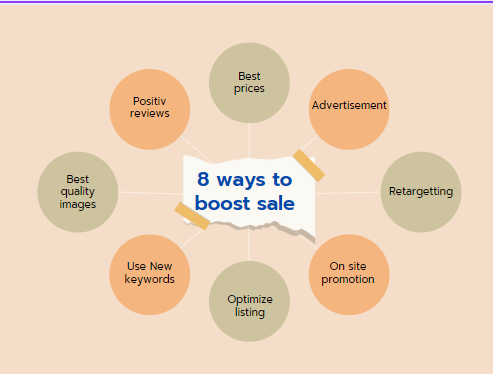
Amazon continues to dominate ecommerce, with over 300 million active customers worldwide. However, rising competition means sellers must adapt to new trends, AI tools, and algorithm changes to stay ahead. Whether you’re a new seller or an established brand, these 12 proven strategies will help you boost visibility, conversions, and sales on Amazon in 2025. 1. Optimize Listings for Amazon’s A10 Algorithm (2025 Update) Amazon’s search algorithm prioritizes relevance, conversion rate, and customer satisfaction. ✅ Keyword Optimization Use long-tail keywords (e.g., “wireless earbuds with 40H battery for gym”) Place keywords in: Title (Max 200 characters) Bullet Points (Focus on benefits) Backend Search Terms ✅ Enhanced Content A+ Content (EBC) – Improves conversions by 10%+ Amazon Posts – Free social-style shopping feature Pro Tip: Use AI tools like Helium 10 or Jungle Scout for keyword research. 2. Leverage AI-Generated Product Images & Videos In 2025, AI-powered visuals will dominate top-performing listings. ✅ Use AI Tools for: Background removal (Photoroom, Remove.bg) Lifestyle images (Midjourney, Canva AI) Short demo videos (Synthesia, Pictory) Stat: Listings with videos convert 3.5x more than those without. 3. Win the Buy Box More Often 82% of Amazon sales happen through the Buy Box. ✅ How to Increase Buy Box Ownership: ✔ Maintain >95% seller rating ✔ Offer fast shipping (Prime-eligible) ✔ Use automated repricing tools (RepricerExpress, Sellerise) 4. Run Hyper-Targeted Amazon PPC Campaigns Amazon Ads are getting smarter with AI. Optimize for: ✅ Automatic Campaigns (Let Amazon find keywords) ✅ Manual Targeting (Focus on high-converting keywords) ✅ Sponsored Display Ads (Retarget shoppers) Bid Strategy: Start with low bids, then increase for top-performing keywords. 5. Offer Subscription & Loyalty Discounts Amazon’s Subscribe & Save boosts repeat sales. ✅ Discount Strategy: 5% off for 1-4 items 15% off for 5+ items Pro Tip: Use automated email follow-ups to remind subscribers. 6. Improve Amazon SEO with Voice Search Optimization 50% of U.S. shoppers use voice search (Alexa, Google Assistant). ✅ Optimize for Voice Search: Use natural language (e.g., “best waterproof Bluetooth speaker for pool parties”) Answer FAQ-style questions in bullet points 7. Get More 5-Star Reviews (Without Breaking Policies) Amazon’s 2025 review policies are stricter—here’s how to get reviews legally: ✅ Amazon Vine Program (Get early reviews from trusted testers) ✅ Request a Review Button (Amazon’s built-in tool) ✅ Insert Product Inserts (Politely ask for feedback) Avoid: Paid reviews (Can lead to account suspension). 8. Expand Globally with Amazon International Marketplaces Selling in Europe (UK, Germany, France) + Japan/Mexico can double sales. ✅ Use Amazon’s FBA Export ✅ Localize Listings (Translate keywords & descriptions) 9. Use Amazon Live & Influencer Collaborations ✅ Amazon Live – Free live shopping streams ✅ Influencer Shoutouts – Partner with micro-influencers Stat: Live shopping increases conversions by 30%. 10. Reduce Returns with Enhanced Product Transparency ✅ 3D/AR Product Previews (Coming to Amazon in 2025) ✅ Accurate Size Charts & Fit Guides 11. Monitor Competitors with AI Pricing Tools ✅ KeepTrack – AI-powered repricing ✅ Jungle Scout – Track competitor sales 12. Prepare for Amazon’s 2025 Trends ✅ AI-Powered Chatbots (For customer service) ✅ Drone Delivery Expansion (Faster Prime shipping) Final Thoughts: Dominate Amazon in 2025 By implementing these 12 cutting-edge strategies, you can outrank competitors, boost conversions, and maximize profits on Amazon in 2025. 🚀 Need Expert Help? InfoBeam Solutions is a Top Amazon SPN Partner—specializing in Amazon SEO, PPC, and global expansion. 📞 Call +91-9654553640 or 📧 Get a Free Audit

Miscellaneous

How to Improve Your Online Sales in Ecommerce: 10 Proven Strategies

The ecommerce industry is booming, but competition is fierce. If your online store isn’t converting visitors into buyers, you’re missing out on revenue. Whether you sell on Amazon, Shopify, eBay, or your own website, these 10 proven strategies will help you boost conversions, increase average order value (AOV), and maximize sales. 1. Optimize Your Product Pages for Maximum Conversions Your product page is where the buying decision happens. Improve it with: ✅ High-Quality Images & Videos – Show multiple angles, zoom features, and lifestyle shots.✅ Clear, Benefit-Driven Descriptions – Focus on how the product solves a problem.✅ Customer Reviews & Ratings – Social proof increases trust (92% of buyers read reviews).✅ Strong Call-to-Action (CTA) – Use buttons like “Buy Now” or “Add to Cart” in contrasting colors. Pro Tip: Use A/B testing to see which product page version converts better. 2. Improve Website Speed & Mobile Experience A 1-second delay in page load time can reduce conversions by 7%. ✅ Optimize Images (Compress with TinyPNG or ShortPixel).✅ Use a Fast Hosting Provider (Shopify, BigCommerce, or AWS for high-traffic stores).✅ Test Mobile Responsiveness (Over 60% of ecommerce traffic comes from mobile). 3. Leverage Email Marketing & Abandoned Cart Recovery 70% of shoppers abandon carts—recover them with: ✅ Automated Cart Recovery Emails – Send a reminder within 1 hour.✅ Discount Incentives – Offer 5-10% off to complete the purchase.✅ Personalized Product Recommendations – Suggest related items. Example:“You left something behind! Complete your order now and get 10% OFF!” 4. Run Retargeting Ads to Bring Back Visitors Only 2-3% of visitors buy on their first visit. Retarget them with: ✅ Facebook & Google Ads – Show ads to users who browsed but didn’t buy.✅ Dynamic Product Ads – Display the exact products they viewed.✅ Special Offers – Use urgency: “Last Chance! Only 3 Left in Stock!” 5. Upsell & Cross-Sell to Increase Order Value ✅ “Frequently Bought Together” (Amazon does this well).✅ “You May Also Like” suggestions at checkout.✅ Bundle Deals – “Buy 2, Get 10% Off!” Example: If a customer buys a camera, suggest a tripod, SD card, or case. 6. Offer Free Shipping & Easy Returns Free shipping is the #1 incentive for online shoppers: ✅ Set a Minimum Order Value (e.g., “Free Shipping on Orders Over $50”).✅ Highlight Return Policy – “30-Day Hassle-Free Returns” builds trust. Stat: 93% of shoppers are more likely to buy if free shipping is offered. 7. Use Social Proof (Testimonials, Influencers, UGC) ✅ Customer Reviews & Ratings – Display them prominently.✅ Influencer Collaborations – Partner with micro-influencers for credibility.✅ User-Generated Content (UGC) – Encourage customers to share photos. Example: “Join 10,000+ happy customers!” 8. Optimize for SEO to Drive Organic Traffic ✅ Keyword-Optimized Product Titles & Descriptions (Use tools like Ahrefs or SEMrush).✅ Blog Content – Write guides like “Best Wireless Earbuds in 2024” to attract buyers.✅ Internal Linking – Link related products to keep visitors engaged. 9. Run Limited-Time Promotions & Flash Sales Scarcity drives action: ✅ Countdown Timers – “Sale Ends in 3 Hours!”✅ Limited Stock Alerts – “Only 5 Left!”✅ Seasonal Discounts – Black Friday, Cyber Monday, Holiday Sales. 10. Provide Excellent Customer Support ✅ Live Chat – Solve queries instantly (Tools like Zendesk or Tawk.to).✅ Fast Response Time – Aim for under 5 minutes.✅ Post-Purchase Follow-Up – Ask for feedback and offer support. Final Thoughts: Turn Browsers Into Buyers! By implementing these 10 ecommerce sales-boosting strategies, you can increase conversions, reduce cart abandonment, and maximize revenue. 🚀 Need Expert Help?InfoBeam Solutions specializes in ecommerce growth strategies. Contact Us today to skyrocket your online sales!      

Miscellaneous

10 Proven Steps to Improve Your Product Visibility on Ecommerce Platforms

In the crowded world of ecommerce, getting your products noticed is half the battle. Whether you’re selling on Amazon, eBay, Shopify, or other marketplaces, increasing visibility is key to driving traffic, conversions, and sales. For businesses like InfoBeam Solutions, optimizing product listings and leveraging smart strategies can make a huge difference. Here are 10 actionable steps to boost your product visibility on ecommerce platforms. 1. Optimize Product Titles with Keywords Your product title is the first thing shoppers see. Make it clear, descriptive, and keyword-rich. ✅ Best Practices: Include brand name + product type + key features (e.g., “InfoBeam Pro Wireless Earbuds – Noise Cancelling, 30H Battery, Bluetooth 5.2”). Use high-volume keywords (check competitor listings & keyword tools). Keep it concise (Amazon recommends under 200 characters). Pro Tip: Avoid keyword stuffing—focus on readability and relevance. 2. Write Detailed & SEO-Friendly Product Descriptions A well-crafted description improves search rankings and conversions. ✅ Best Practices: Highlight benefits (not just features). Use bullet points for easy scanning. Incorporate long-tail keywords naturally. Answer common customer questions. Example: ❌ “This is a high-quality wireless earbud.” ✅ “Enjoy crystal-clear sound with InfoBeam Pro Wireless Earbuds. Featuring noise cancellation, 30-hour battery life, and a secure fit for workouts.” 3. Use High-Quality Images & Videos Visuals significantly impact click-through rates (CTR). ✅ Best Practices: High-resolution images (1000×1000 pixels for Amazon zoom feature). Multiple angles & lifestyle shots (show product in use). Infographics for key specs. Short demo videos (increases conversions by 10-15%). Pro Tip: Follow marketplace guidelines (e.g., Amazon requires a white background for the main image). 4. Leverage Backend Keywords (Hidden SEO) Most ecommerce platforms allow backend keywords that aren’t visible to customers but help in search ranking. ✅ Best Practices: Include synonyms, misspellings, and related terms. Avoid repetition (platforms like Amazon penalize keyword stuffing). Use all available character limits (e.g., Amazon allows 250 bytes). 5. Encourage & Manage Customer Reviews Positive reviews boost rankings and build trust. ✅ Best Practices: Follow up with buyers (politely ask for feedback). Respond to reviews (even negative ones professionally). Offer exceptional customer service to reduce bad reviews. Pro Tip: Use Amazon’s “Request a Review” button or automated email follow-ups. 6. Run Sponsored Ads & Promotions Paid ads increase visibility for competitive keywords. ✅ Best Practices: Amazon Sponsored Products / eBay Promoted Listings – Bid on high-intent keywords. Discounts & Lightning Deals – Attract bargain hunters. Retargeting Ads – Bring back visitors who didn’t purchase. Pro Tip: Start with auto campaigns, then switch to manual keyword targeting based on performance. 7. Improve Your Product Ranking with Sales Velocity Ecommerce algorithms favor products with higher sales & conversion rates. ✅ Best Practices: Offer limited-time discounts. Bundle products (increase average order value). Use external traffic sources (social media, email marketing). 8. Optimize for Mobile Shoppers Over 70% of ecommerce sales happen on mobile. ✅ Best Practices: Ensure fast-loading images. Use short, scannable descriptions. Check mobile preview before publishing. 9. Utilize Social Media & Influencer Marketing Drive external traffic to your listings for better rankings. ✅ Best Practices: Share products on Facebook, Instagram, Pinterest, TikTok. Partner with micro-influencers for authentic promotions. Run giveaways & contests to increase engagement. 10. Monitor Performance & Adjust Strategies Track metrics to refine your approach. ✅ Key Metrics to Watch: Impressions vs. Clicks (CTR). Conversion Rate. Return on Ad Spend (ROAS). Tools to Use: Amazon Seller Central / eBay Analytics. Google Analytics (for Shopify stores). Helium 10 / Jungle Scout (for keyword research). Final Thoughts Improving product visibility on ecommerce platforms requires a mix of SEO optimization, paid ads, customer engagement, and data-driven adjustments. By implementing these strategies, InfoBeam Solutions can rank higher, attract more buyers, and boost sales. 🚀 Ready to dominate ecommerce search results? Start optimizing today!

Scroll to Top

Get Free Consultation

Claim your FREE Seller Account Audit & Consultation now – submit the form and we’ll contact you within 24 hours!
Legal-friendly: Your personal data will be processed securely and only for the purposes stated; we will not disclose it to third parties.